
Imagine Joe, a local restaurant owner running three locations. Joe is driving from one location to another on a Saturday afternoon when he realizes that the third location needs to close early for a private event.
The setting is in the Owner mobile app, just 3 clicks deep. But finding it right now feels risky, so he calls our team.
The call goes well. Our team answers the median call in 75 seconds.
But the customer found it easier to wait on hold than to use the setting in the dashboard, even though the change itself took 3 seconds to make.
In the near future, our customers will know they can easily ask Owner Agent to handle changes like this, even by phone - and to do much more besides.
What Owner Agent does
OA needs a broad range of capabilities because Owner does many jobs for each restaurant (website, SEO, online ordering, branded app, loyalty, reporting, point of sale, and others).
At one end of the range are simple actions. These are essential for the owners who won't open the dashboard to change their hours (or add a modifier, or change some text). They’ll call, even if it takes three clicks.
With Owner Agent, they can get those things done with a conversation.
At the other end of the range, Owner Agent also needs to support sophisticated customers who want a deep understanding of their business and growth. Some owners run dozens of locations. They want to know what's moving on their menus, which locations are growing, how many corporate customers they serve, and whether regulars are coming back.
Later, Owner Agent will start offering help without being asked, proactively, like suggesting a coupon in time for National Taco Day to drive app orders.
We want Owner Agent to be the way owners reach everything we can do for them, not a sidebar bolted onto an app. For that reason, Owner Agent has entry points spread throughout the product (in addition to a prominent placement in the tab bar next to Home and Inbox):
- On the home screen, Owner offers to fix items in a "Needs Your Attention" section. Tapping it opens Owner Agent with a briefing on the problem, with the right location for the setting pre-attached.
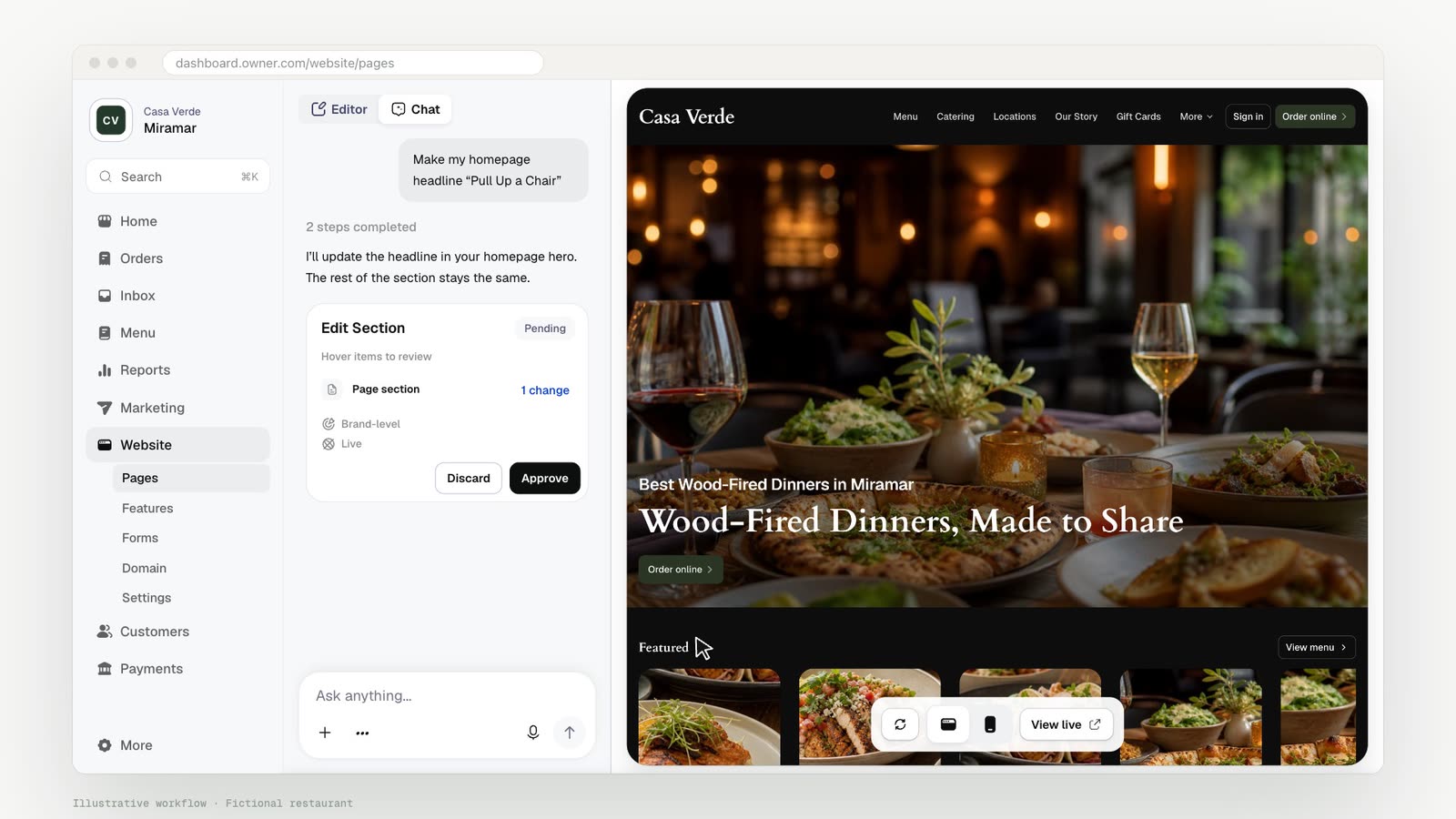
- In the website builder, the agent appears beside the live preview. Edits show up in the preview as the owner approves them.
- Opening the agent from a menu item attaches that item to the conversation (e.g. "make this $2 cheaper").
- Some onboarding steps, like connecting a domain, are passed to the agent if an owner gets stuck.
There’s some cost to doing this; entry points have to be designed screen by screen, by the team that owns each screen, and each needs to give the agent enough context to be useful on the first message. We think it will pay off.
Where we started
We picked our own customer-facing teams as our starting point. Those teams include more than 100 people having thousands of conversations a week.
Setting up a new restaurant's menu was one of their more time-consuming jobs. A rep would open a Google Drive with hundreds of food photos, half of them unlabeled, and try to match each one to a menu item by sight. Owner Agent can see images, so it reads the menu PDF and deconstructs it into items and modifiers. It matches each photo to a dish on the menu, and the rep can just approve it.
Starting with our team meant the agent got used heavily, every day, by people who knew the outcome they were hoping to get and could tell us when something didn’t work. Many of the tools owners use today were hardened there first. That has already shown up in the numbers: since reps started working in Support View with Owner Agent, resolutions per rep per day have more than doubled.
Now we’re putting it in front of owners. The initial users have raved about it, including in the App Store, but there's still a lot to build.
Three building blocks: channel, tool, capability
Every request to Owner Agent passes through three layers: from the channel where the request is received, through a tool, into a capability that’s proven by evals.
- 01Channel
- How the owner reaches us: dashboard, app, email, or phone call. The channel decides how an action can be shown and approved, e.g. a complicated menu change is easy to review on a card and much harder to follow in a long email thread.
- 02Tool
- One narrow operation, like changing a menu price or updating a photo. Our codebase is full of functions that change hours or refund an order. A tool is the bridge between one of those functions and something the agent can call.
- 03Capability
- The set of tools and instructions that gets an owner to an outcome, like "update my menu for the fall." Each capability is proven by evals, which we'll describe in the section below on evals from historical support cases.
Keeping the owner in control
Owners often send complex requests, like:
Remove the pollo taco from the menu at the Miramar location. Also add tomatillo as a salsa option there. In Atlanta, raise the price of guac by $1.
A human support agent would always know to confirm the full list of changes in writing before taking action. Similarly, Owner Agent follows these rules to make changes safely:
- Get approval for every change. Owner Agent generates an approval card that describes the item, the location, and the change. It presents the “before” and “after” in plain language. Customers can approve and reject each row on the card individually. We call this bar "clarity of operation" internally.
- Act with the same permissions as the user. Tools use the same role-based access control as the rest of our platform. One reason this is important is that a restaurant employee might not have the same permissions as the owner. For example, if the employee can't issue refunds in the dashboard, then that person also won’t be able to use Owner Agent to issue one. This principle also holds when the agent works via email as opposed to an in-product chat window: it will still act on behalf of that user.
- Escalate to a human support rep when Owner Agent can’t solve the problem in one conversation. Owner Agent hands off to our support reps to pick up where it left off, including the full conversation history and context.
How we built it
We have 4 principles that define our approach to building.
Principle 1: One agent
We’ve embedded the same agent, with the same tools, into all surfaces - including our dashboard and app, and also the tools our support team uses while communicating with customers.
Emails and calls are powered by a background worker. On a call with a human support agent, the conversation is transcribed in real time. A small model opens an agent conversation for each of the customer’s requests, and it aims to make the change ready to approve by the time the owner finishes speaking.
Principle 2: Agent as a platform
Almost everything an owner can do already exists as a service in our codebase. In theory we could have built up an Agents team to wrap all the parts of the product. But we’ve instead made Agent into a platform that all of our product teams are developing for. The Agents team owns the platform, including the agent loop, permissions, approvals, evals, and observability. But each pod owns its own tools.
Every tool is built with ownerTool, a thin layer over the Vercel AI SDK's tool type.
A tool declares typed inputs and outputs, whether it needs approval, which channels it can operate
through, and the permission it requires.
We picked AI SDK because it works across model providers, has incredible DX, and is one of the most popular agent frameworks out there. (When we started, OpenAI's Agents SDK had no TypeScript version.) Claude Agent SDK only supports Anthropic's models, which makes it non-viable almost immediately.
Principle 3: Read-first
We built read tools first, and more than half of our tools still only read. For example: finding menu items, summing orders, ranking items, looking up customers, pulling reports.
Read-only tools don't need approval. The agent can use as many of those as it needs before proposing an action.
Having so many tools created a context problem, though. When we tried sending 100+ tools at once, it slowed the agent down significantly, reduced quality, and increased costs.
We instead narrow down the list by permissions, surface, and channel.
Skills enable progressive loading of a domain's full instructions until they’re required for that task. We’ve also built a tool search function, which keeps tool definitions out of the context until they’re needed.
Principle 4: Evals from historical support cases
With help from our BizOps team, we mined more than 224,000 past support cases from Snowflake and clustered them into scoreable capabilities. The cases have all been closed already. So for each case, we have full clarity on what the owner asked for (the input to an eval), what our team changed (the expected result), and how long it took (which is how we prioritize which capabilities to build first).
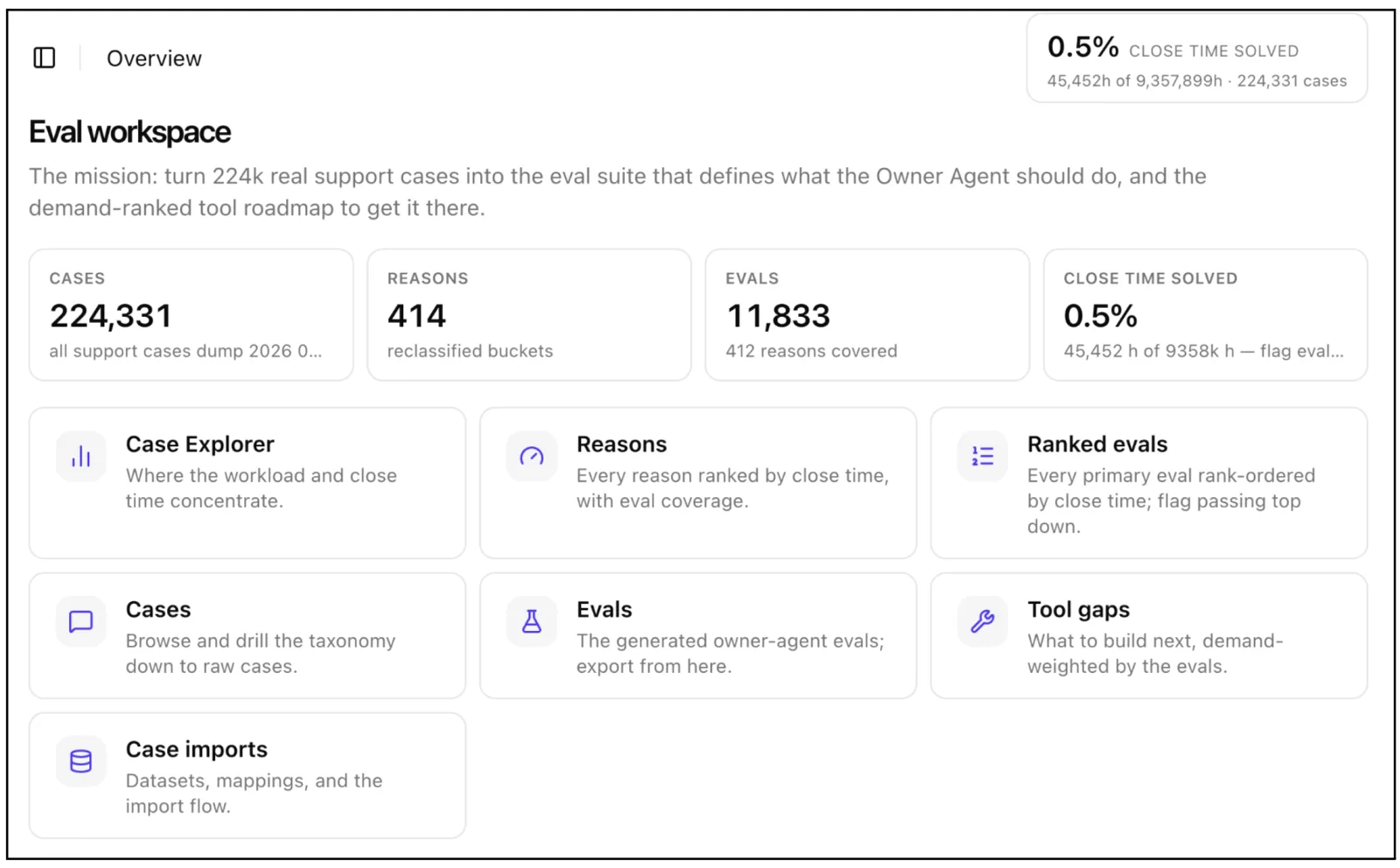
Menu updates account for roughly 10,000 of those cases - about 5%. We apply 3 levels of categorization to each case. That distilled the menu-updates cases to 414 distinct reasons. From there, we can prioritize the most time-consuming reasons, aiming for Owner Agent to cut into that time.
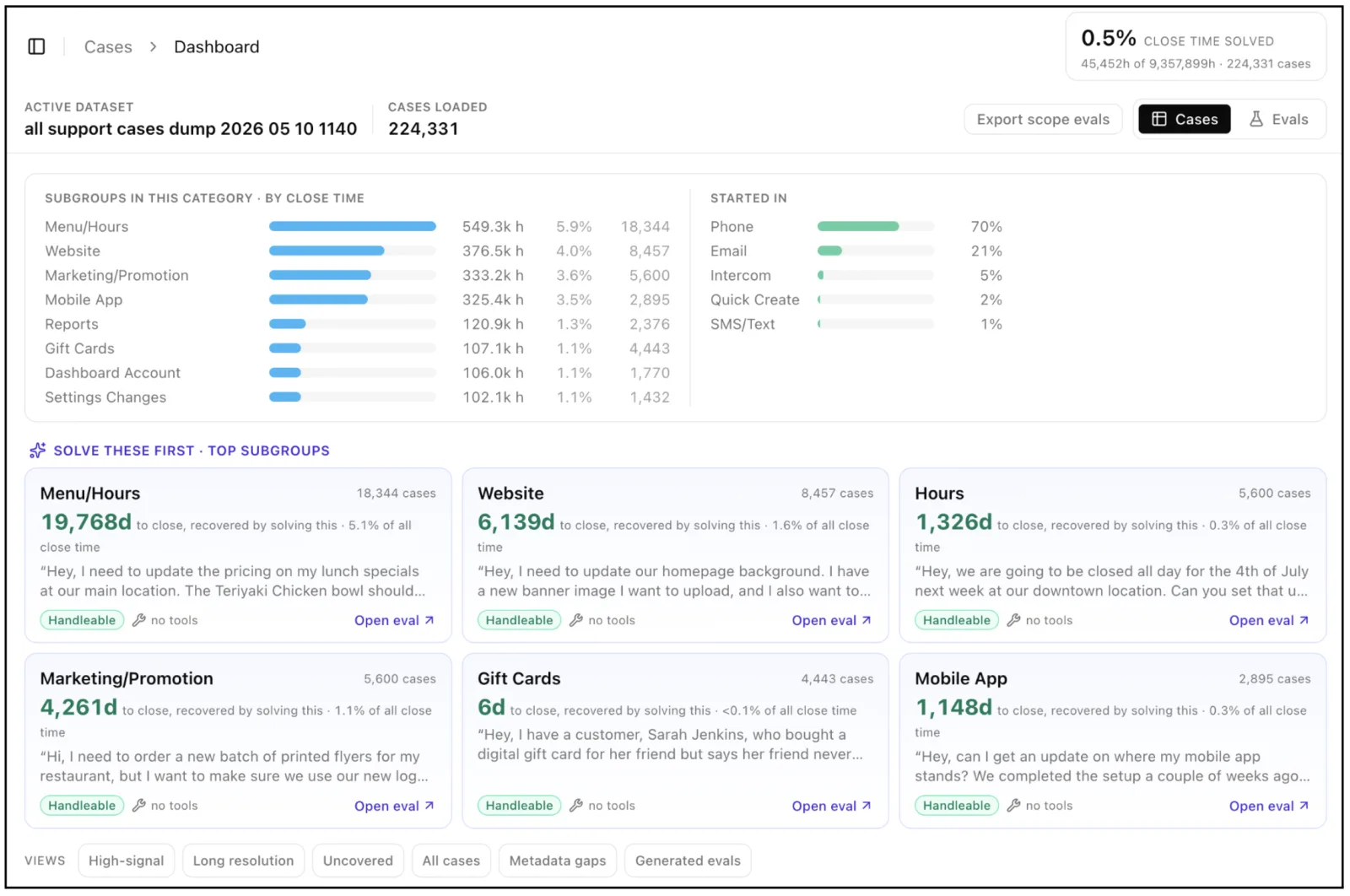
The cases overlap more than someone might think at first. If one case needs operations A, B, and C, and another needs A through D, then you just need four operations. We were able to distill our 224,000 cases to about 2,000 distinct operations.
There’s a difference between having all the necessary operations to handle a case, and handling the case. For example, some cases are so complicated that they can involve 70 interactions back-and-forth, with multiple reps involved. Our eval harness runs the real agent with its real tools against each case, a second model scores the result against the expected outcome, and the suites run in Buildkite.
Observing the agent in production
Customers in production are asking Owner Agent for new things, beyond what the historical support data could have prepared it for. We've invested heavily in seeing what the agent does in the wild. Here are our main observability principles:
Agent traces go to Datadog, the same place as the rest of our product APM. We run a trace from the request, through each model call and tool call, down to the database query. Each tool call also records a short note from the model on why it made the call. Finally, we record which model was used for each response, so that we can compare models eventually.
Online evals score real conversations. We built Owner Agent Insights to read the conversations. Every few hours it samples finished conversations, always including any with a thumbs up or down. An LLM-as-judge model scores each conversation as good, needing improvement, or failed.
Insights turns scores into a roadmap. Insights groups failures that share a cause and a solution, which turns scattered complaints into a tool recommendation. When owners ask for something the agent can't do, Insights writes it up as a Recommended Tool and alerts in Slack the team that owns that area.
Requests that fit no area collect in what we call a ghost domain. A ghost domain that keeps growing is owners describing, in their own words, a part of Owner the agent doesn't cover yet.
Every failure becomes an eval. When Insights flags a failure, Forge, our internal platform for background coding agents, turns the conversation into an offline eval case, works to solve it, and runs the evals in Buildkite. This ensures that the new case passes and that the rest that are solved will still pass too.
Lessons from building an agent
If we were starting over, here are some of the principles we’d keep and implement from the beginning:
- Make the agent part of the product experience, and let the teams that own those surface areas design the entry points.
- Start from the requests customers have already made - support history is the closest thing you have to a spec.
- Match the agent’s permissions to the user’s.
- Build read tools first: any action is only as good as what the agent can read when taking that action.
- Make every change easy to confirm (one row per change, plain language, no action taken before human approval).
- Invest in observability early.
- Turn every failure into an eval.
What's next
The biggest change ahead is proactive help. Owner Agent will notice things owners haven't asked about, like a decline in repeat orders or a holiday that could merit a coupon. Owner Agent will offer to act on these. We're also bringing it to more of the phone line.
The owner in that car on Saturday should be able to say "close Lakeview at six tonight" and keep driving. Some days that already works. We’re making it work for everything Owner does, and the next post in this series will get deeper into how we’re building it.
If this sounds like something you want to work on, we're hiring.